
A 3D game creator should help you build something you can move through, interact with and finish. Start with one scene and a clear objective: find three signals, open a gate or drive to a destination. That gives you a way to evaluate the AI’s work as a game.
OhMyGame brings design notes, generated assets, code and playable checks into one local project. An agent can implement an interaction, open the game and help find problems while you refine the idea. The app runs on your computer; the web game you publish can be opened through a browser link.
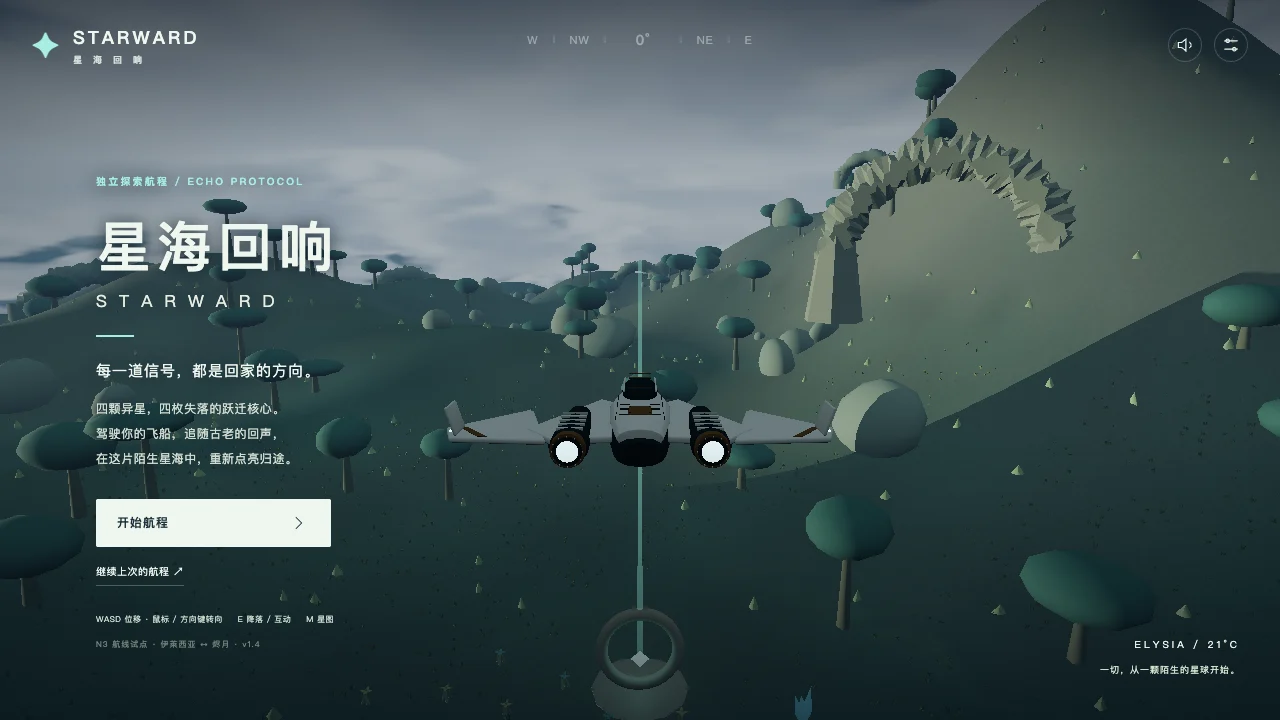
A 3D game you can open in your browser
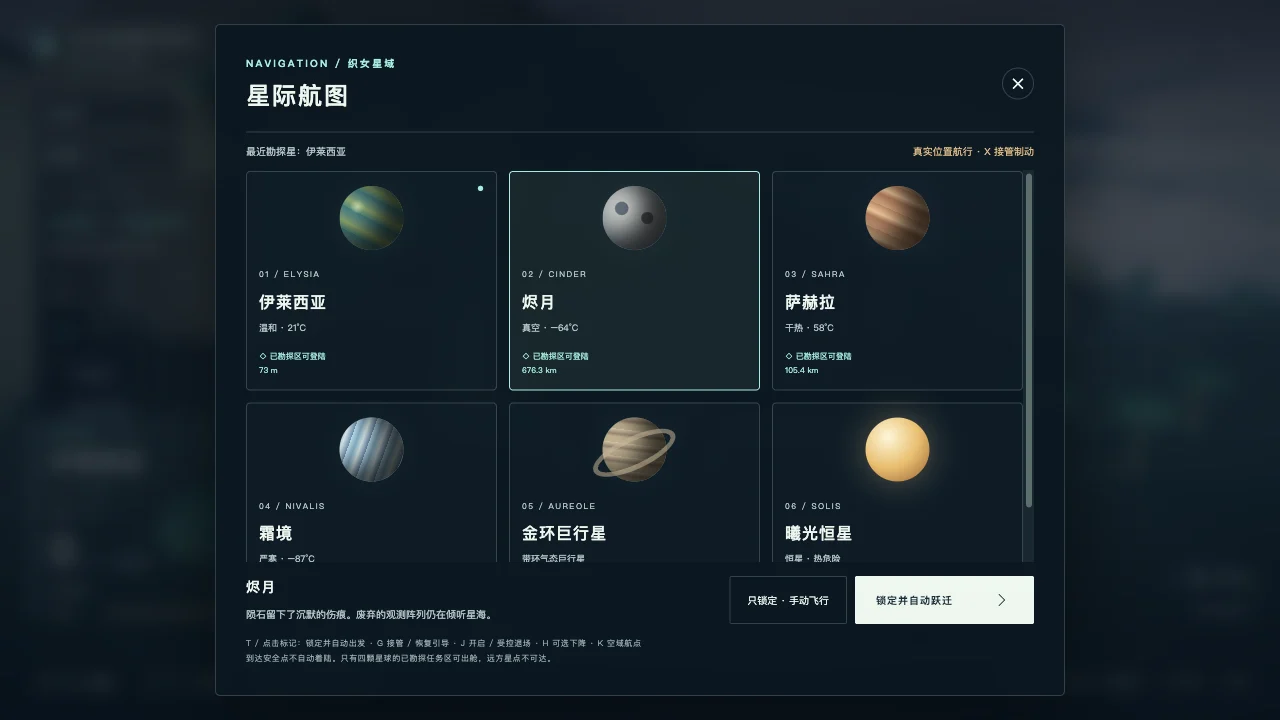
STARWARD is a community example built around a spacecraft, planetary terrain and an exploration objective. Its interface combines flight information, a mission panel and a star map.
We checked movement and opened the star map in a desktop browser. The screenshots and recording below come from that visit. They show a playable scene with navigation and interface controls; the author’s original prompts and production history are not supplied by the public listing.
For a first project, take a smaller slice of that idea: one landscape, one controllable vehicle and three objects to find. Build the complete route from starting the game to finishing it before expanding the world.
What websites let you make 3D games for free?
There are browser editors, downloadable engines and AI-assisted studios. Compare where you edit, which files you keep and how the finished game is shared. The suggested uses below describe workflows, not measured performance rankings.
| Tool | Where you create | What to use it for | Cost conditions to check |
|---|---|---|---|
| OhMyGame | macOS or Windows app | Generate assets, implement interactions and run playtests in one editable local project; publish a web game by link | Free, open-source app; connected model services have their own costs |
| GDevelop | Browser or desktop editor | Build 2D/3D scenes and rules with visual events and AI assistance | Free engine; AI, online services and publishing options depend on the plan |
| VXLVERSE | Browser | Start with a ready game structure, change its characters and goals, then share it | Its site offers free creation and sharing; check the current feature scope |
If you want a downloadable engine, Godot is another option for scenes and scripts. If you prefer to describe a change and inspect editable project files, an AI 3D game creator workflow in OhMyGame keeps that work together. See its introduction for the supported project types and publishing flow.
Give the game a clear loop before adding detailed models
A scene needs rules to become a game. Write them in a few sentences:
The player explores a small island in a hovercraft. Three signal beacons are visible from different parts of the island. Approach each beacon and interact to activate it. After all three are active, a gate opens and the player can reach the landing pad to finish.
This brief supplies movement, interaction, progress and an ending. It also gives you concrete checks: a beacon should count once, the gate should stay closed early, and restart should restore the initial state.
Keep these systems small:
| System | First version | What to check |
|---|---|---|
| Scene | One compact landscape with visible landmarks | Can the player find a route without a map? |
| Controller | Movement, turning and a reset action | Does the vehicle stay within the intended area? |
| Camera | A follow view with a readable horizon | Does terrain or geometry hide the objective? |
| Interaction | One action near a beacon | Does the action work only within the intended range? |
| State | Three beacon flags, a gate and a finish state | Can each beacon count only once? |
| HUD | Controls, current objective and progress | Is it legible at a narrow screen width? |
A prompt for a 3D video game playable in a browser
Use this original example brief for a smaller prototype. Set the project scope and checks before asking for detailed art.
Build a small playable 3D browser game with Three.js.

The player drives a hovercraft around one island, activates three
signal beacons and reaches a landing pad through an unlocked gate.

First build:
- simple geometry for the island, hovercraft, beacons and gate;
- WASD or arrow-key movement with a stable follow camera;
- boundaries and a reset action if the hovercraft becomes stuck;
- an interaction key that works only near a beacon;
- beacon progress that cannot count the same object twice;
- a gate that opens after all three beacons are active;
- a finish screen and restart that resets the entire game;
- visible controls, objective and progress.

Separate scene setup, input, gameplay state and UI code.
Keep movement consistent using elapsed time between updates.
Start the scene only when its required resources are ready.

Open the game and check movement, interaction range, duplicate
activation, the locked gate, finishing and restarting.
Report what was tested and any problems that remain.
Add models and textures after this full loop works.
For touch support, make a second request with a control layout and test it on the intended devices. A narrower viewport checks layout; it does not establish that touch input or performance works on a real phone.
Build the 3D web game in stages
1. Establish movement and camera scale
Use simple shapes to set the vehicle’s size, speed, turning and camera distance. Drive around the same short route after each adjustment. Ask the agent to keep the tuning values together so you can change one value at a time.
2. Connect an action to visible progress
Add one beacon first. Show when interaction is available and how the objective changes afterward. Then add the remaining beacons and the gate. Keep the game state separate from the decorative effects so replaying an animation cannot award progress twice.
3. Add assets that fit the scene
Prepare a reference for scale, palette and lighting. A hovercraft, three beacon variations and a small terrain set are enough. Use lightweight models and appropriately sized textures, then test loading and movement before increasing detail.
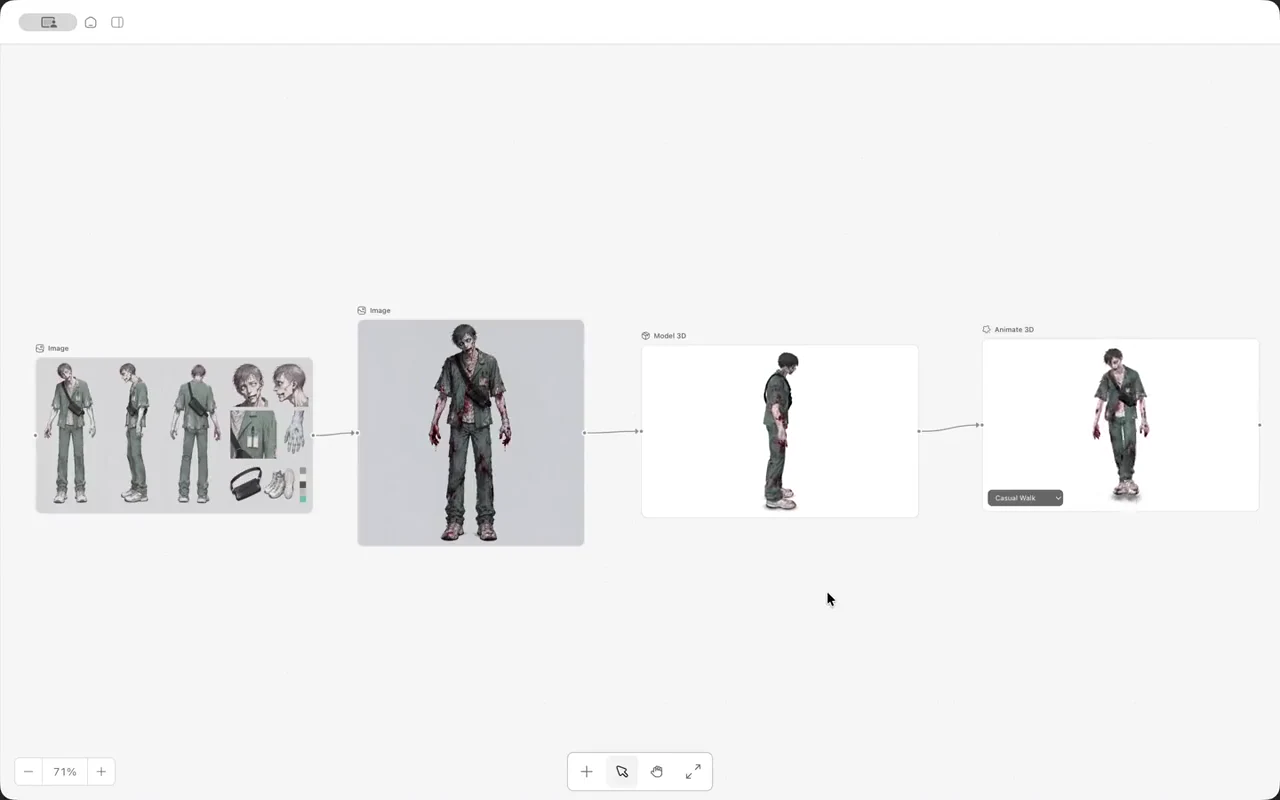
In OhMyGame, the reference, assets and implementation can stay in one project while you ask for changes. Model generation prepares content for the scene; check its orientation, materials, scale and collision behavior when you integrate it.
4. Check loading, restart and missing resources
Give the player a clear loading state. Check that a missing model or sound produces a useful message or fallback. Restart should reset the beacons, gate, player position and finish screen. If the game pauses, decide what happens to held inputs and ongoing actions when it resumes.
5. Publish and test the shared version
For an OhMyGame web project, sign in and publish a browser link. Open it separately and check that resources load from the published addresses, controls work and the route can be completed. Try the devices and browsers you intend to support.
Use playtests to choose the next improvement
Watch someone discover the first objective. If they cannot tell where to go, improve a landmark, camera angle or instruction before adding another area. If a model looks good but hides the interaction, adjust its scale or placement and try again.
An agent can help check actions and look for errors, while your own playtests judge navigation, comfort and difficulty. The useful advantage of OhMyGame is keeping those code changes, assets and playable checks close together. For a driving-focused project, use the racing game prompt guide to define handling and circuit rules.
FAQ
Can AI make a 3D game that plays in a web browser?
AI can help write the code and prepare assets for a web game. You still need to choose a manageable scope, test the interactions and verify the shared build. The community example above shows an actual browser-playable result.
Do I have to make the game inside a browser?
No. The editor and the published game can run in different places. OhMyGame is a desktop app, while its published web games open in a browser. A browser editor is another option if installation is a deciding factor.
Is a free 3D game creator enough for the whole project?
Check the application, model usage, assets and publishing separately. OhMyGame’s app is free and open source; connected providers have their own usage terms and costs. Other tools may put limits on AI requests or online services.
What should I make first?
Choose one scene, one movement system, one interaction and an ending. A three-beacon route or a short driving course gives you a complete loop to test before expanding the project.