
A purely cursor rhythm game can turn moving, clicking or tracing a path into a musical action. You can build the core play around one of those inputs, without requiring keyboard controls. If you want movement only, choose a concept that also works without clicking.
A small set of inputs gives you room to focus on timing, readable patterns and comfortable movement. One short track is enough to compare a few patterns before committing to a full game.
Here are ten concepts, including click-based and movement-only options. You can try one in OhMyGame: ask the agent to build the cursor interaction, timing cues and scoring, generate the visuals, then open the game to test it. The code and assets stay together in an editable local project.

Choose how to build your first prototype
This comparison describes documented workflows. Suggested uses are editorial guidance, not results from a head-to-head benchmark.
| Approach | What it gives you | Your next step |
|---|---|---|
| OhMyGame | An agent builds the interaction and scoring, creates visual assets and opens the game for playtests in the same project | Pick one idea below, use the starter prompt and try changes to the hit window or target spacing |
| A chat assistant and a code editor | Help drafting timing logic or reviewing a script | Integrate the code, assets and audio, then run the game yourself |
| A game engine or web framework | Direct control over scenes, input and audio code | Implement the timing loop and build your own test scene |
OhMyGame is a free, open-source desktop app for macOS and Windows; connected model services have their own usage costs. Its useful advantage here is keeping art, implementation and playable checks together while you experiment.
Set the input rules before choosing an idea
Decide whether “cursor only” means mouse movement with clicks, or movement alone. Make menus, pause and restart usable with the same device so a keyboard is optional throughout.
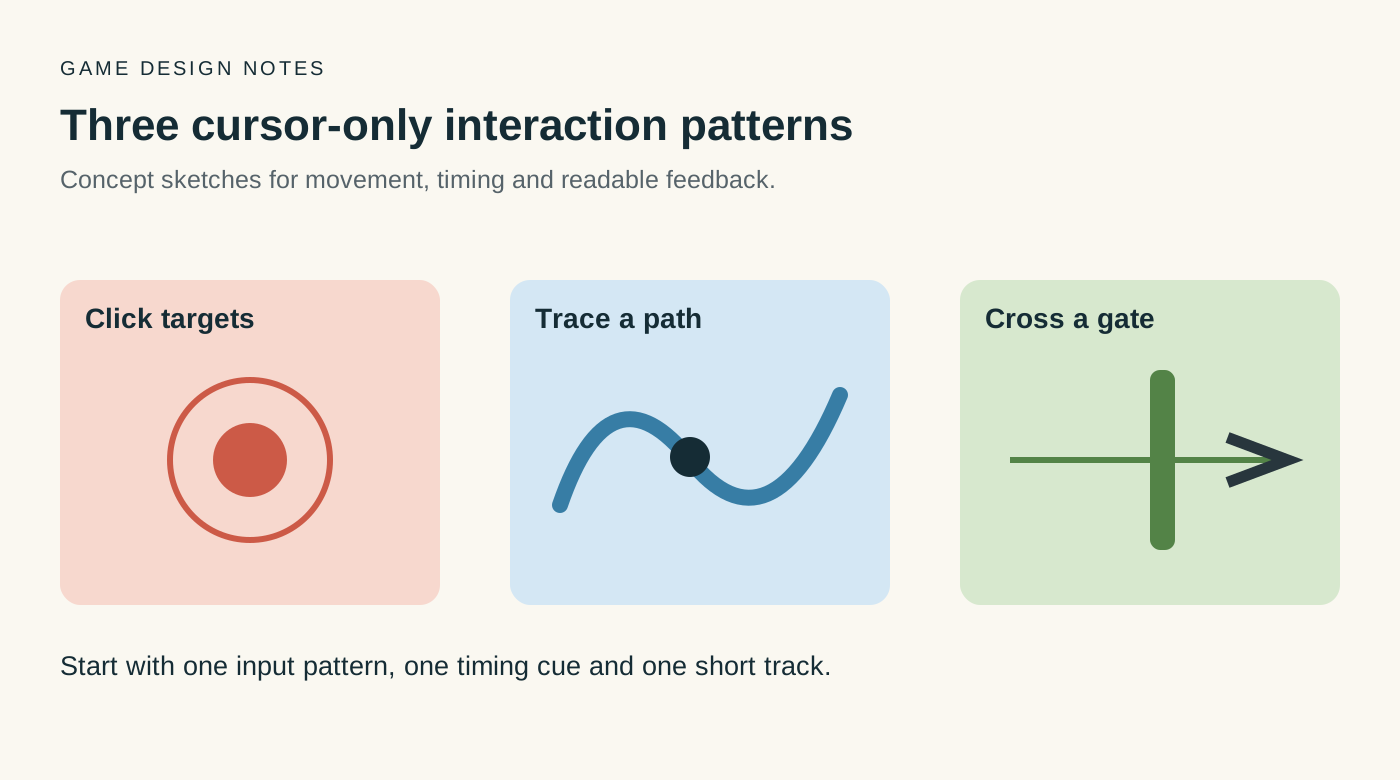
Then choose a clear timing cue, such as a shrinking ring or a highlighted gate. Include an audio offset control and test comfortable movement distances before making patterns faster. Use music you have permission to include in the shared build.
1. Beat Targets
The classic cursor rhythm game: targets appear around the screen and shrink toward a hit ring. Click when the ring meets the target.
Core loop: read the next target, move the cursor, click on the beat, keep the combo.
Difficulty lever: target spacing, not just speed. Two far-apart targets force a different movement than ten close ones.
What to test: can a new player understand the shrinking ring without an explanation?
First build: one 60-second track, one target type, three spacing patterns.
2. Orbit
A ring sits in the center. A marker travels around it. Hold the mouse button when the marker crosses a highlighted arc.
Core loop: track a moving point, press at the right angle, release at the right angle.
Difficulty lever: direction changes and double arcs.
What to test: make the beginning and end of each hold easy to read.
First build: one ring, one direction, eight arcs.
3. Cursor Path
Draw a path through nodes in time with the music. The cursor must stay inside a moving ribbon as it crosses checkpoints.
Core loop: follow the ribbon, hit each node, do not leave the lane.
Difficulty lever: curvature and speed changes.
What to test: let the player follow the ribbon by movement alone and check whether its pace feels musical.
First build: a single S-curve with five nodes and a generous ribbon.
4. Pulse Gates
A cursor moves between two chambers through a gate that opens on the beat. The player crosses the gate during the opening, then prepares for the return trip. No click or keyboard input is needed.
Core loop: read the next pulse, approach the gate, cross on time.
Difficulty lever: gate width, crossing distance and changes in the beat pattern.
What to test: show the next opening early enough that the player can prepare a movement instead of reacting to a flash.
First build: two chambers, one gate and a slow eight-bar pattern.
5. Cursor Conductor
Make gestures on the beat: a circle, a zigzag, a loop, a straight line. The game recognizes the shape and the timing.
Core loop: see the gesture, draw it, finish on the beat.
Difficulty lever: longer gestures and tighter timing.
What to test: compare mouse and trackpad input, with generous shape recognition at first.
First build: three shapes and a very forgiving recognizer.
6. Dodge the Beat
Hazards pulse with the music. Show the next safe zone ahead of time, then ask the player to reach it on the beat using cursor movement alone.
Core loop: read the pulse, move to a safe area, survive the bar.
Difficulty lever: overlapping hazards and shrinking safe zones.
What to test: whether the preview gives enough time to choose and reach a safe zone.
First build: one hazard pattern and a three-lane safe zone.
7. Rhythm Puzzle Grid
A grid of tiles lights up in a sequence. Click the correct tiles in time, but each tile changes the next pattern.
Core loop: memorize a short sequence, click it on beat, react to the change.
Difficulty lever: sequence length and rule changes.
What to test: whether the rule change is understandable while the player follows the rhythm.
First build: a 3×3 grid, four-step sequence, one rule change.
8. Cursor Boss
A boss exposes weak points on the beat. Click the weak point, dodge the counterattack, repeat.
Core loop: aim, click, move out of the danger zone, read the next phase.
Difficulty lever: more weak points and shorter windows.
What to test: whether attack and dodge cues remain distinct when patterns overlap.
First build: one boss, three attack patterns, one health bar.
9. One-Screen Story
The cursor is the camera or the character’s attention. Move it to the right object on the beat to change the scene.
Core loop: listen, move, click the visual cue, reveal the next line.
Difficulty lever: ambiguous cues and overlapping choices.
What to test: whether the next object is readable without distracting from the scene.
First build: four scenes, one click each, one ending.
10. Desktop Jam
The game looks like a tiny desktop. Windows, folders and icons pulse with the music. The cursor opens, drags and closes them on beat.
Core loop: read the desktop, perform the requested action, keep the rhythm.
Difficulty lever: multitasking and fake notifications.
What to test: whether each desktop action stays clear as windows overlap.
First build: three windows, one drag, one click, one close.
Which idea should you build first?
| If you want… | Try… | First question to test |
|---|---|---|
| A simple click-based prototype | Beat Targets | Is the hit moment clear? |
| Movement without clicking | Cursor Path or Pulse Gates | Does following the beat feel comfortable? |
| Expressive gestures | Cursor Conductor | Can the recognizer tolerate different drawing styles? |
| A short narrative | One-Screen Story | Does the player notice the next cue? |
| An opponent and phases | Cursor Boss | Can the player read attack and dodge cues together? |
Try one concept with a few people. Watch where they hesitate and ask what they thought the next action would be. Adjust the cue or spacing before adding more patterns.
A small prototype plan
First pass: timing and one pattern
- import one 60–90 second track;
- add a calibration offset;
- implement one target and one hit window;
- show perfect, good and miss feedback;
- play it yourself ten times.
Second pass: variety and a fail state
- add three patterns;
- add a combo and a score;
- add a restart button;
- test at 60 Hz and 120 Hz;
- check whether visual cues remain readable with sound off.
- confirm that menus, pause and restart can be used with the mouse.
Keep the menus minimal and save cosmetics and leaderboards for later. For this test, focus on the relationship between the movement, timing cue and music.
Prompt for the first playable
Build a browser prototype of a purely cursor-based rhythm game.

Start with one 75-second track that I have permission to use.
Targets appear at fixed positions and shrink toward a hit ring.
The player clicks when the ring meets the target.

Include:
- audio calibration offset;
- perfect, good and miss windows;
- combo and score;
- a restart button;
- mouse-accessible pause and restart, with optional keyboard shortcuts.

Keep the first chart to three patterns:
1. targets close together;
2. targets on opposite sides;
3. a short burst of three targets.

Keep this first version click-based. Do not require keyboard input.
Test the build on a trackpad and a mouse before adding another mechanic.
Turn the idea into a playable game with OhMyGame
To make a rhythm game with AI, start with one cursor mechanic in OhMyGame. Generate a visual direction, ask the agent to build timing and scoring, and open the game for a test. You can change target spacing or the hit window and try the revised version in the same project.
The files stay on your computer, so you can keep a working version and inspect the implementation. When the chart is ready for feedback, publish a browser link for other players. The app is free and open source; any connected model services have their own usage terms.
Keep the timing tied to the audio
For a browser implementation, use an audio timeline such as Web Audio’s currentTime as the basis for hit judgments, rather than counting rendered frames. The Web Audio specification defines that clock. Test the chart on different devices and display rates, and let players adjust the audio offset.
FAQ
What are some ideas for a purely cursor rhythm game I could make?
For clicking, start with Beat Targets. For movement only, try Cursor Path or Pulse Gates. If you want gestures or a short story, Cursor Conductor and One-Screen Story give you different directions to explore.
Can I make it work without clicking?
Yes. Judge when the cursor crosses a gate, reaches a checkpoint or enters a safe zone. Choose a dwell or hover interaction for menus if you want the whole experience to avoid clicks.
Should I support trackpads?
Try the first pattern on one before deciding. Adjust movement distance, cue size and the timing window based on what you observe.
What music should I use?
Use a track you created or have permission to include. Check the permission covers the way you plan to share the prototype, including any attribution requirements.
How do I make the timing feel right?
Base judgments on the audio timeline, include calibration, and compare the same pattern on different devices. Then adjust the spacing and visual cues through playtests.