
For a first desktop NPC prototype in Unity, Qwen3-4B-Instruct-2507 is one concrete baseline you can integrate and test. Compare a larger model if it misses your dialogue or structured-output requirements. The model card establishes its identity and license; it does not establish which model is best for your Unity game.
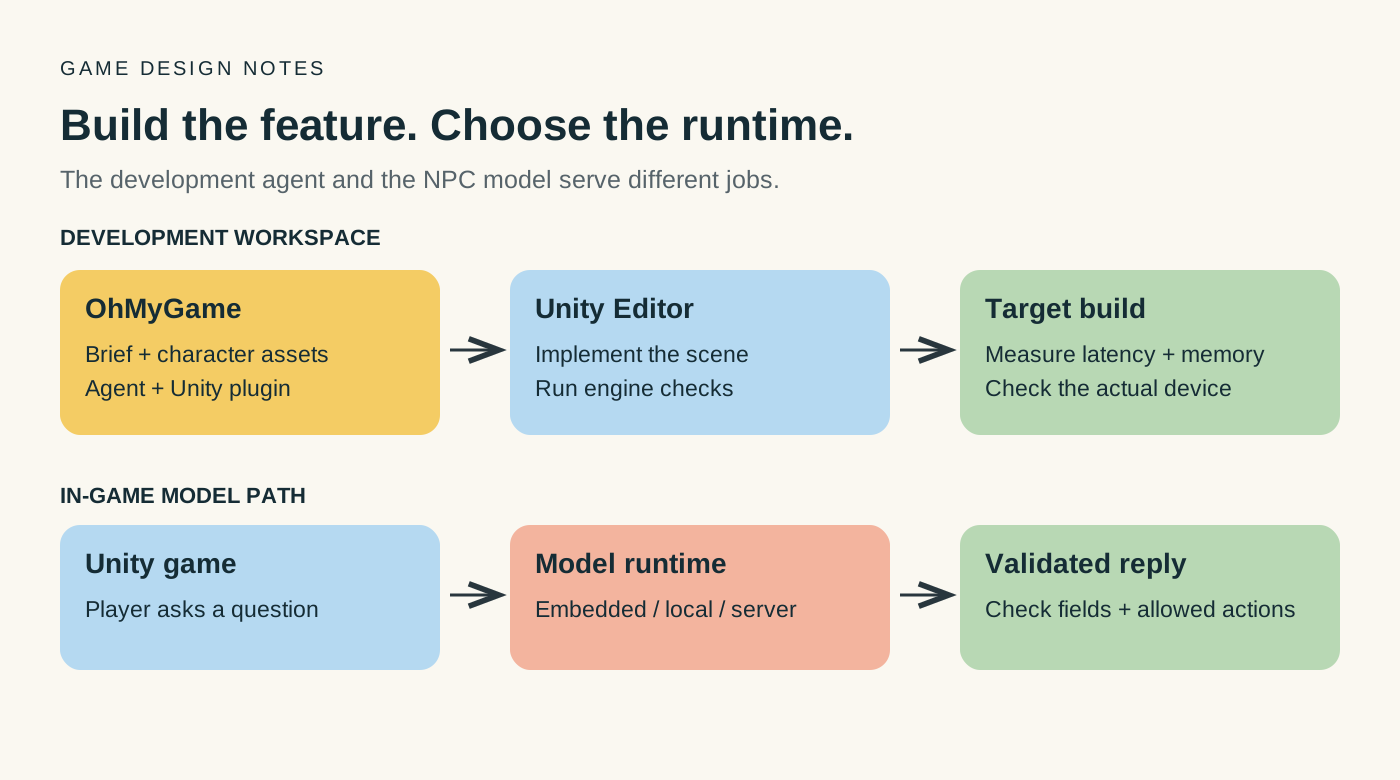
The best choice depends on the job. An NPC replying to a player, a system returning quest data and an assistant writing C# have different requirements. For the development workflow, OhMyGame brings an agent, character assets, design notes and project files together, with a Unity plugin for engine work. Keep that development assistant separate from the model you plan to ship inside the game.
The candidates below are identifiable baseline versions, not a claim about the newest or fastest models available. The recommendations are starting points for your own test; no comparative Unity benchmark was run for this guide.
A practical starting point
- Build the feature with an agent: use OhMyGame to keep NPC references, generated assets and implementation work in one local project; set up its Unity plugin for engine tasks.
- Local desktop NPC: test a quantized Qwen3-4B-Instruct-2507 with a supported runtime.
- More room for a larger local candidate: compare Qwen3-8B on the same prompts and hardware.
- A second model family: Mistral-7B-Instruct-v0.3 provides another versioned baseline.
- Unity integration: try LLMUnity for an embedded/local workflow, or call a local HTTP service during development.
- A game serving many online players: evaluate a server endpoint so you can control model versions and inference resources.
Start with one conversation scene. Measure response time and memory while the rest of the game is running, then decide whether to change the model or deployment path.
Compare the tools around the model
This comparison describes documented workflows. Suggested uses are editorial guidance, not results from a head-to-head benchmark.
| Tool or workflow | Role in the project | Why choose it |
|---|---|---|
| OhMyGame | Agent-assisted development, asset creation and project organization; Unity work through its engine plugin | Keep the NPC brief, character assets and code changes in one local workspace, rather than passing them between separate production tools |
| A chat assistant and an editor | Explain C# or draft integration code | Useful for a focused coding question; you integrate and test the result |
| LLMUnity or another supported Unity integration | Run a compatible model in the Unity application | Choose it for the in-game inference path, with device and model-format tests |
| A local or hosted model server | Serve model responses over an endpoint | Swap model versions separately from the game build |
OhMyGame is a free, open-source studio; connected model services have their own usage costs. Its Unity plugin uses Unity’s own editor and tools, so install and configure the engine first. The checkpoint comparison below answers a separate question: which model should power the NPC?
Check the model license separately from the runtime
Downloadable weights, an open-source inference library and an unrestricted redistribution license are different things. A model distributed under Apache-2.0 has different terms from a model under a custom community license. Neither tells you, on its own, whether a particular Unity package supports the model format you have downloaded.
For the exact checkpoint and any quantized derivative, check commercial use, redistribution, attribution and additional use conditions. Check the runtime and Unity integration as separate components. Keep the model identifier and license with the project so you know which version you tested.
The four deployment paths
1. Local model inside the game
Bundle a supported model and runtime, or download the model during setup. This can support offline dialogue, but model storage, memory and compute become part of the player’s requirements.
Use it for: prototypes, offline tools, desktop games with a controlled hardware target.
Check carefully: target-device memory, loading time and sustained performance. Mobile support depends on the integration, model and device; test it rather than assuming desktop behavior will carry over.
2. Local server beside the game
The game talks to a local HTTP service, for example one provided by Ollama or llama.cpp. The model runs outside the Unity process, which lets you change it without rebuilding the game.
Use it for: development, internal tools, a desktop companion app, or a game that expects the player to install a model runner.
Trade-off: the service must be installed, started and reachable. Plan that setup explicitly if it will be part of the player experience.
3. Your own remote server
The game calls an endpoint you host. You can control the deployed model and request policy, and share inference capacity across players. A common API shape can simplify swapping the backend, but confirm the endpoint’s supported features.
Use it for: online NPC dialogue or structured responses that need a controlled model version.
Trade-off: you need to budget for hosting, concurrency and failure handling, and decide which player data reaches the service.
4. A managed provider
A managed API can help you test the feature before maintaining inference infrastructure yourself. If your goal is an open-weight model, check the exact model and version the provider offers.
Use it for a prototype, then decide whether an open-weight model can replace it at your target quality and cost.
Specific models to compare
Use the exact identifier when recording results. The “first use to test” column is a suggested experiment, not a measured quality ranking.
| Candidate | Published license | First use to test | What to check |
|---|---|---|---|
| Qwen3-4B-Instruct-2507 | Apache-2.0 | A small desktop NPC scene | Dialogue consistency, response time and your JSON schema |
| Qwen3-8B | Apache-2.0 | Whether a larger model improves your difficult cases | Memory, reasoning settings and response formatting |
| Mistral-7B-Instruct-v0.3 | Apache-2.0 | A second-family dialogue baseline | Chat template and runtime support |
| Llama-3.2-3B-Instruct | Custom Llama 3.2 license | A smaller open-weight comparison | License conditions, languages and runtime support |
Llama is included as an open-weight comparator, not as an Apache-licensed equivalent. Check any additional terms attached to the quantized files you actually distribute.
A model may load correctly but still return text your game cannot use. Test exact field names, allowed actions and missing-context cases. For quest tools, let the game validate a proposed action before changing inventory, rewards or progression.
Estimate storage, then measure memory in the game
Parameter count helps estimate the space occupied by weights, but it is not a complete RAM or VRAM requirement. At an idealized four bits per parameter, the raw weight payload is approximately:
| Dense model size | Raw 4-bit payload, decimal GB |
|---|---|
| 3B | 1.5 GB |
| 4B | 2.0 GB |
| 7B | 3.5 GB |
| 8B | 4.0 GB |
| 14B | 7.0 GB |
These are calculations, not measurements: parameters × 4 ÷ 8 bytes. Quantization metadata, unquantized components, runtime buffers and the context cache add overhead. The game’s own assets and rendering also need memory.
Measure cold loading, peak memory and time to first visible text while running a representative scene. Repeat with the context length and number of conversations you expect to support. CPU inference may be acceptable for some dialogue designs; its suitability depends on the device and the response-time target.
Connect one conversation before building the full system
Option 1: LLMUnity
LLMUnity provides a Unity integration built on a llama.cpp-based backend, with examples for local conversations and related features. Check the supported formats and platforms for the package version you install. Its software license is separate from the model license.
Start with its smallest conversation sample. Load the chosen model, run one reply, then test cancellation and unloading. Repeat in a standalone build; an Editor test does not establish that the shipped package works on the target device.
Option 2: a local HTTP service
During development, you can keep the model in a separate service and call it from Unity with UnityWebRequest or another suitable client. This lets you swap models while keeping the scene unchanged.
For example, Ollama’s documented compatibility endpoint supports a subset of common API operations. Confirm the request fields and streaming behavior you need. The service must be running and have the intended model installed.
Option 3: a remote endpoint
For an online feature, keep private provider credentials on a backend and let the Unity client call that backend. Add authentication, request limits, timeouts and a fallback line. Validate structured replies before passing them to game systems.
For browser builds, also account for browser networking and cross-origin restrictions. A URL that works in the Unity Editor may not be reachable from the published game.
Handle cancellation and fallback early
If the player closes the conversation or changes scene, cancel the request when possible and ignore late responses for the old conversation. Keep a scripted fallback for an unavailable service or an invalid reply, so the player can continue.
A benchmark you can actually run
Build a small test set from the interactions your game needs. Twenty prompts can reveal integration problems before you invest in a larger comparison.
For an NPC system:
- 5 greetings with different moods;
- 5 responses that must include a JSON field;
- 5 attempts to make the NPC leave its role or reveal hidden lore;
- 5 cases with missing context.
For a tool-calling system:
- 5 valid tool requests;
- 5 ambiguous requests that should ask a question;
- 5 disallowed actions that must not change game state;
- 5 multi-step requests.
Measure:
- first-token latency;
- total latency;
- tokens per second;
- JSON validity;
- tool-call accuracy;
- memory after 20 turns;
- crash rate;
- cost per 1,000 requests.
Keep the machine, context budget, generation limits and test cases consistent. Use the chat template required by each model and record it with the runtime and quantization version. Compare median and slower-case latency as well as valid, usable responses.
Choose by the failure you need to fix
If the first model follows the NPC role and meets your response-time target, keep it while you build the rest of the feature. If it fails a specific requirement, change one variable at a time.
- Too much memory: try a smaller model, shorter context or a different deployment path.
- Replies arrive too late: test shorter responses and context, then compare runtime settings.
- Invalid JSON or tool actions: constrain the response format where supported and validate it in the game.
- Poor dialogue quality: compare a second model with the same character context and test cases.
- Need C# generation rather than NPC dialogue: evaluate a development assistant on your Unity code separately.
Keep the simplest candidate that meets the requirements you can actually demonstrate.
Use OhMyGame to build the surrounding workflow
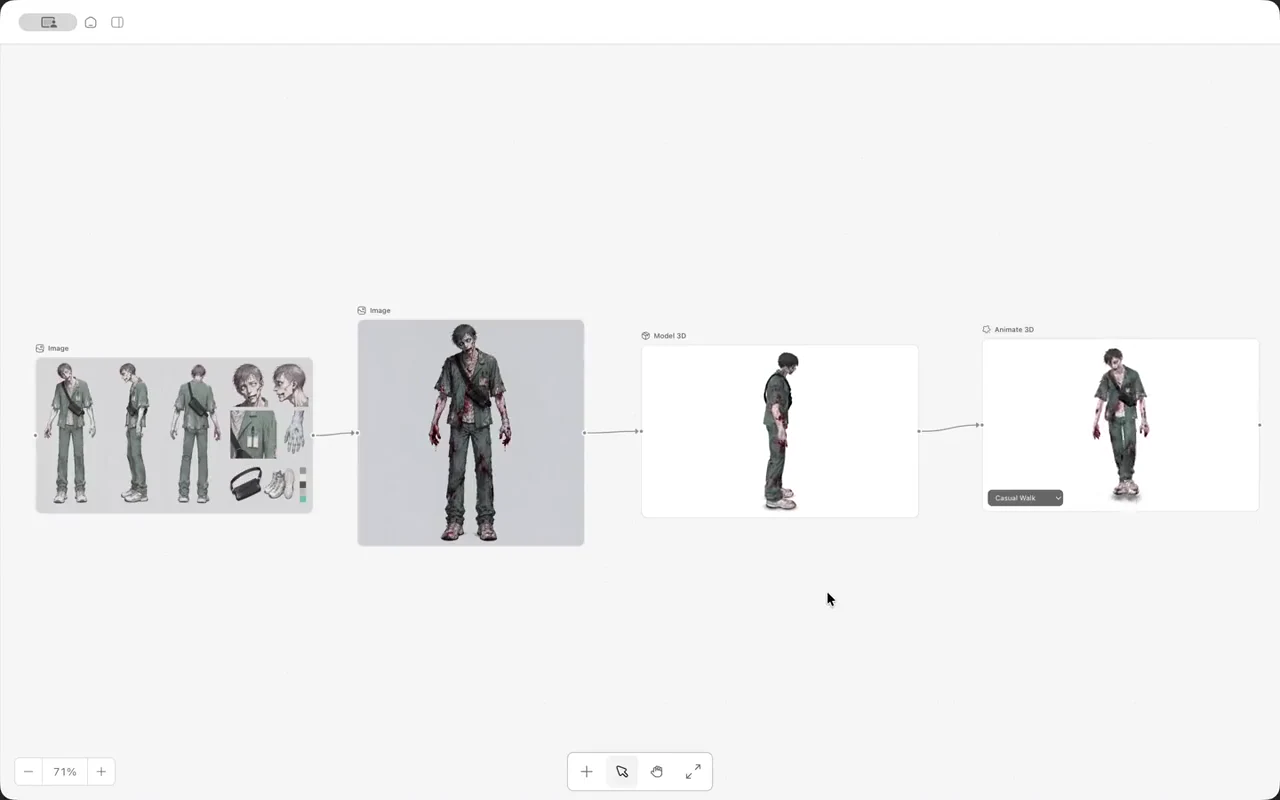
An AI game development studio such as OhMyGame can help organize the work around the model: the NPC brief, references, character assets and integration code. Its Unity plugin connects the development workflow to the engine’s own tools; measure the NPC model in your actual Unity build.
The app is free and open source, and your project files remain local, so you can inspect changes and keep a working version. If the final game is in Unity, run the model and performance checks in your actual Unity build; those results should decide which model you ship.
FAQ
What is the best open source LLM for Unity?
For a first desktop NPC test, use a versioned candidate such as Qwen3-4B-Instruct-2507 and measure it in your scene. Compare Qwen3-8B or another model if it misses your requirements. This is a starting recommendation, not a claim that one model wins every Unity workload.
Can I run an LLM inside a Unity game?
Yes, with a compatible runtime and platform. LLMUnity offers one integration path. Test the actual model, package and device together, including loading time, memory and behavior after several conversations.
How much VRAM do I need?
There is no fixed amount based on parameter count alone. Raw 4-bit weights are roughly 0.5 decimal GB per billion parameters, before metadata and runtime overhead. Add the context cache and the game’s workload, then measure the build.
Can I run it on mobile?
Some integrations support mobile, but the model size, device memory and sustained performance matter. Compare on-device inference with a server endpoint using the phones you intend to support.
Is a local model free?
A model may be available without a download fee, but you still supply the hardware and must follow its license. Check runtime and integration licenses as well.
Should I use an API instead?
An API can simplify deployment when you have many online players or a wide range of devices. Local inference can fit offline play or a controlled hardware target. Compare the two using the same quality and response-time requirements.